
Prepare and secure the installation or update of TopSolid’Erp with a page bringing together the technical prerequisites, configuration requirements, licenses and resources needed to deploy your environment.
Whether you are performing a first installation, upgrading to a new version or adapting your existing infrastructure, preparing the technical environment is an essential step to ensure the stability and continuity of your industrial management system.
This page presents the prerequisites, specific configurations, installation steps and useful information for updating your TopSolid’Erp environment.
Before Installing TopSolid’Erp
TopSolid’Erp relies on a complete architecture combining user workstations, servers, databases and application components. The required configuration depends in particular on the number of users, the modules deployed and the chosen operating mode (local network, remote access, web extensions).
Before any installation or update, it is therefore essential to check the compatibility of your environment and prepare the various technical components required.
Technical Requirements
Specific Configurations
Key Considerations for Environment Sizing
Some TopSolid’Erp features require particular attention when sizing the IT environment. These elements should be anticipated during the preparation phase to ensure performance suited to business requirements.
Specific Requirements for the Scheduling Module
Because the scheduling module requires significant resources, it is strongly recommended that the workstation dedicated to this module be installed as a full client or on a dedicated VM. It uses the Oracle® 19C 64-bit client.
For general sizing rules in a virtualized environment, see Resource Management in a Virtualized Environment.
TopSolid’Erp Extensions: iTime, iProd and iStock
TopSolid’Erp web extensions extend the use of the system beyond traditional management workstations, particularly for activity tracking, production and field operations.
These modules require a specific IT environment configuration to ensure reliable use from shopfloor workstations, tablets or connected terminals.
Preparing the Installation
Before proceeding with the installation, several elements must be checked to ensure a secure deployment: license availability, environment compatibility, data backup and organization of the required interventions.
Thorough preparation helps minimize risks during deployment and ensures a transition adapted to the company's constraints.
Responsibilities Related to IT Infrastructure
Infrastructure Setup
Services related to IT architecture (operating system installations, drivers, configuration and OS training, network configuration, peripheral configuration, etc.) are outside the scope of TOPSOLID SAS services.
Activate Your TopSolid’Erp Environment
Installing TopSolid requires specific license codes. These codes are provided by your sales contact after you sign your contract and before your environment is installed.
Install or Update TopSolid’Erp
Installing TopSolid’Erp relies on several technical components that must be configured in the correct order to ensure the consistency of the environment.
Once the licenses have been received, you can proceed with the installation:
- Server installation
- Database configuration
- Client deployment
- Initial configuration
Depending on your organization, this step can be carried out independently or with the support of your IT department. In some cases, technical assistance may be required to secure complex environments.
Before any installation or update, it is essential to check the compatibility of your environment, secure your licenses and perform a complete backup of your data.
Planning the installation outside critical production periods also helps minimize operational risks.
Simplified Configuration for Small Installations
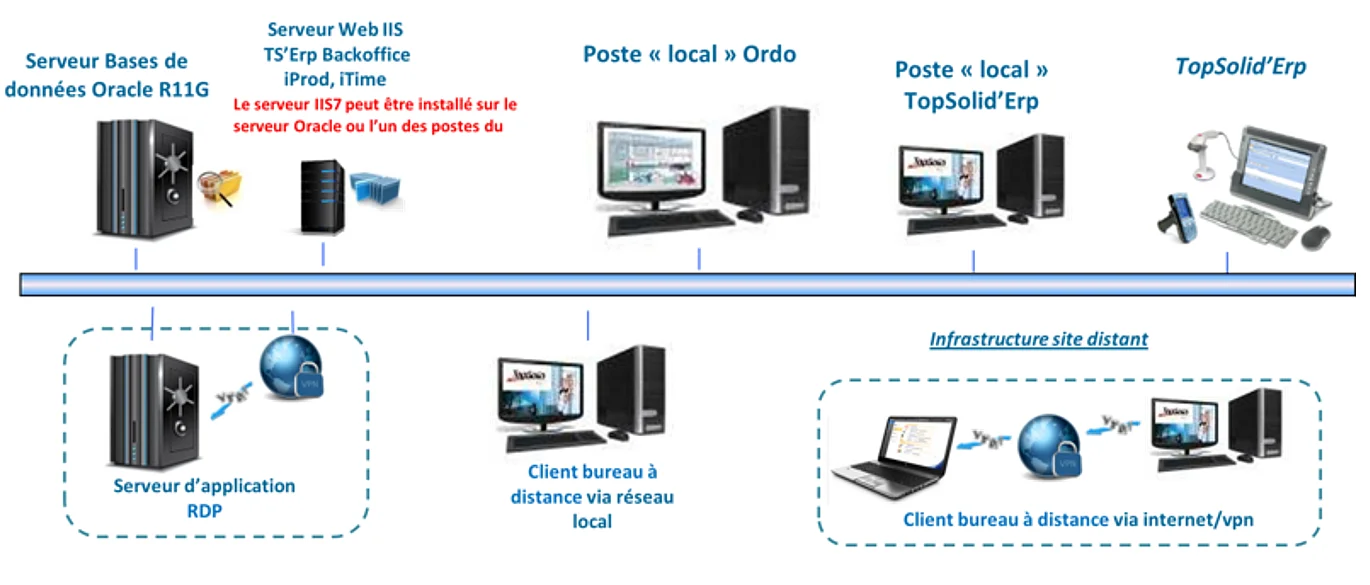
Simplified diagram for a TopSolid’Erp infrastructure on a local network and/or RDP (TSE).
Additional Information About the TopSolid’Erp Environment
Some configurations require additional information relating to server architecture, databases, office environments or equipment used in production.
These elements help anticipate specific technical constraints before your TopSolid’Erp environment is deployed.
TopSolid’Erp Updates and Upgrades
TopSolid’Erp updates provide functional and technical improvements and fixes that help maintain a reliable environment over time.
Each update may require specific preparation depending on your configuration and usage.
Version Highlights
Each TopSolid’Erp release includes functional and technical improvements that may impact your working methods.
Dedicated training for new versions helps users adapt to these changes and progressively develop their skills.

Need Technical Assistance?
Our Technical Support team is available if you encounter any difficulties.
Our teams are organized by product area to provide assistance tailored to your needs.